Travelnet

360° Redesign of a Tourism Booking Platform for Cuba's Largest Accommodation Tour Operator · Feb 2024 – Present
Feb 2024

Project initiated · ongoing toward launch

4 roles

UX · UI · IxD Supervisor · UX-QA

PrimeVue → Extended UIKit

Proprietary Design System

Full autonomy

100% ownership of all design and product decisions

My Rol

UX Lead
IxD
QA-UX
UI Design
QA-UX
UIKit - Design System
UI Design

I was the sole UX/UI owner on this project — from information architecture through interaction design supervision and user-perspective quality assurance. Unlike other projects I've worked on, this team — with low UX maturity — trusted my decisions completely and gave me the freedom to lead my domain almost entirely independently. That autonomy extended into product decisions, where I operated with Product Owner-level influence.

What Makes This Project Different

This wasn't about designing screens. It was about transforming an outdated product into a sales-driven platform — inside a team with no established UX culture — with the freedom to build everything from scratch: mind map, information architecture, complete design system, interaction patterns, and implementation supervision.

The Problem

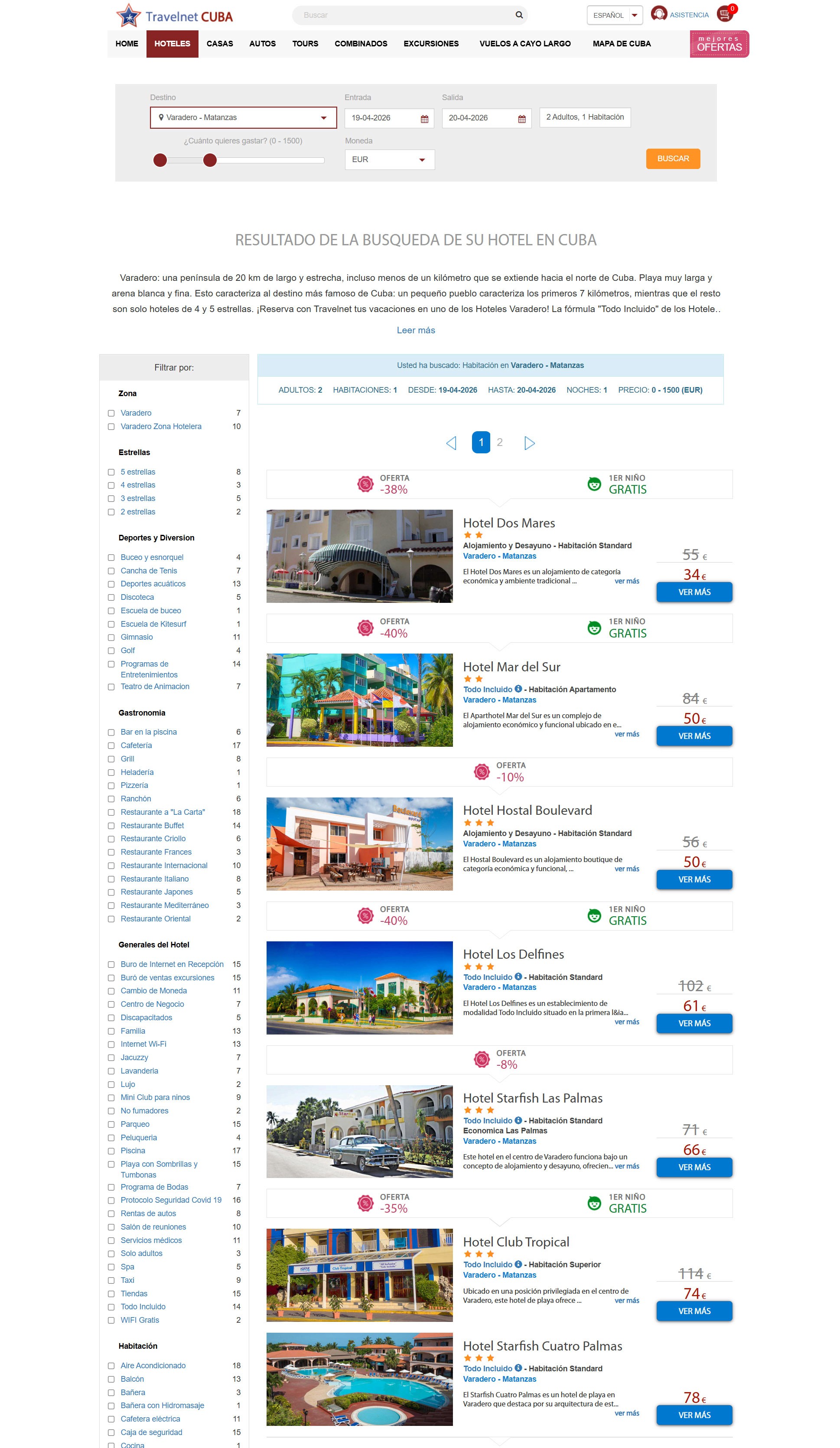
Travelnet is a travel agency headquartered in Havana with branches across Cuba's major tourist destinations. Their existing digital platform was an outdated product: stale content, poor navigation architecture, and critical usability and accessibility failures. It wasn't built for conversion — it was a digital catalogue with no sales flow.

The goal wasn't just to modernize the interface. It was to execute a complete 360° turn on the digital business: transforming an informational site into a booking platform capable of competing in the international tourism market, backed by a scalable system the development team could maintain independently.

Process — From Structure to Interaction

01.

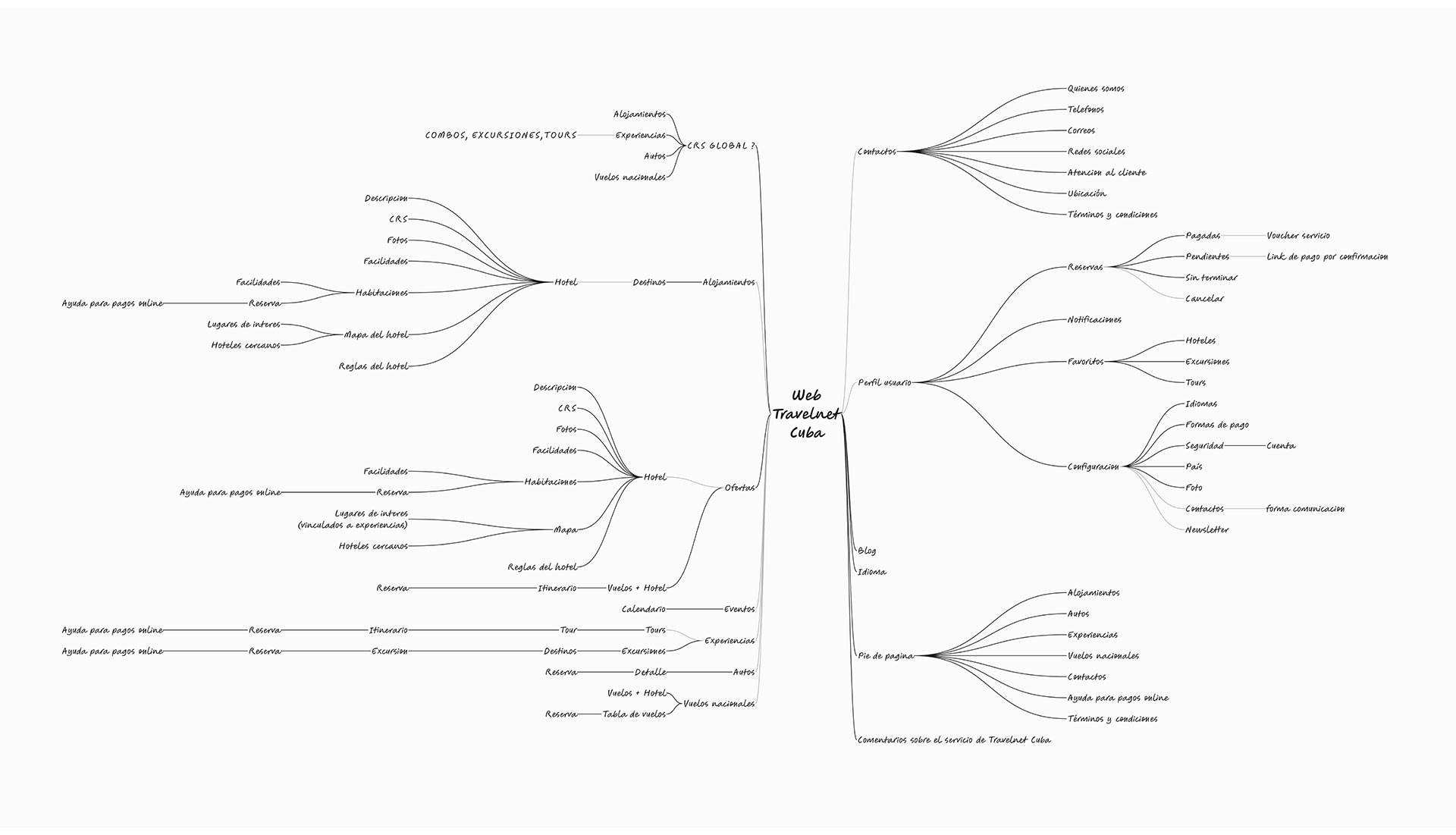
Mind Map: Ordering the Project Before Designing

The starting point wasn't a wireframe — it was a mind map. I used this tool to structure every critical dimension of the redesign: information architecture, usability, accessibility, user flows, and interface design. The mind map also served as a team alignment tool: with a shared visual representation, the team could debate, contribute, and make product decisions collectively — even with low UX maturity across the group.

01.

Mind Map: Ordering the Project Before Designing

The starting point wasn't a wireframe — it was a mind map. I used this tool to structure every critical dimension of the redesign: information architecture, usability, accessibility, user flows, and interface design. The mind map also served as a team alignment tool: with a shared visual representation, the team could debate, contribute, and make product decisions collectively — even with low UX maturity across the group.

Mental map
Team lineup
Scope definition
02.

Conceptual / Cognitive Map: Understanding How Users Think

I designed a conceptual map to visualize the thinking patterns, behaviors, and needs of travelers using booking platforms. This map let me identify the connections between the factors that drive booking decisions — brand trust, ease of use, price transparency, perceived security — and the critical points where users were abandoning the flow.

02.

Conceptual / Cognitive Map: Understanding How Users Think

I designed a conceptual map to visualize the thinking patterns, behaviors, and needs of travelers using booking platforms. This map let me identify the connections between the factors that drive booking decisions — brand trust, ease of use, price transparency, perceived security — and the critical points where users were abandoning the flow.

Cognitive map
Reserve flow analysis
Identification of drop-off points
03.

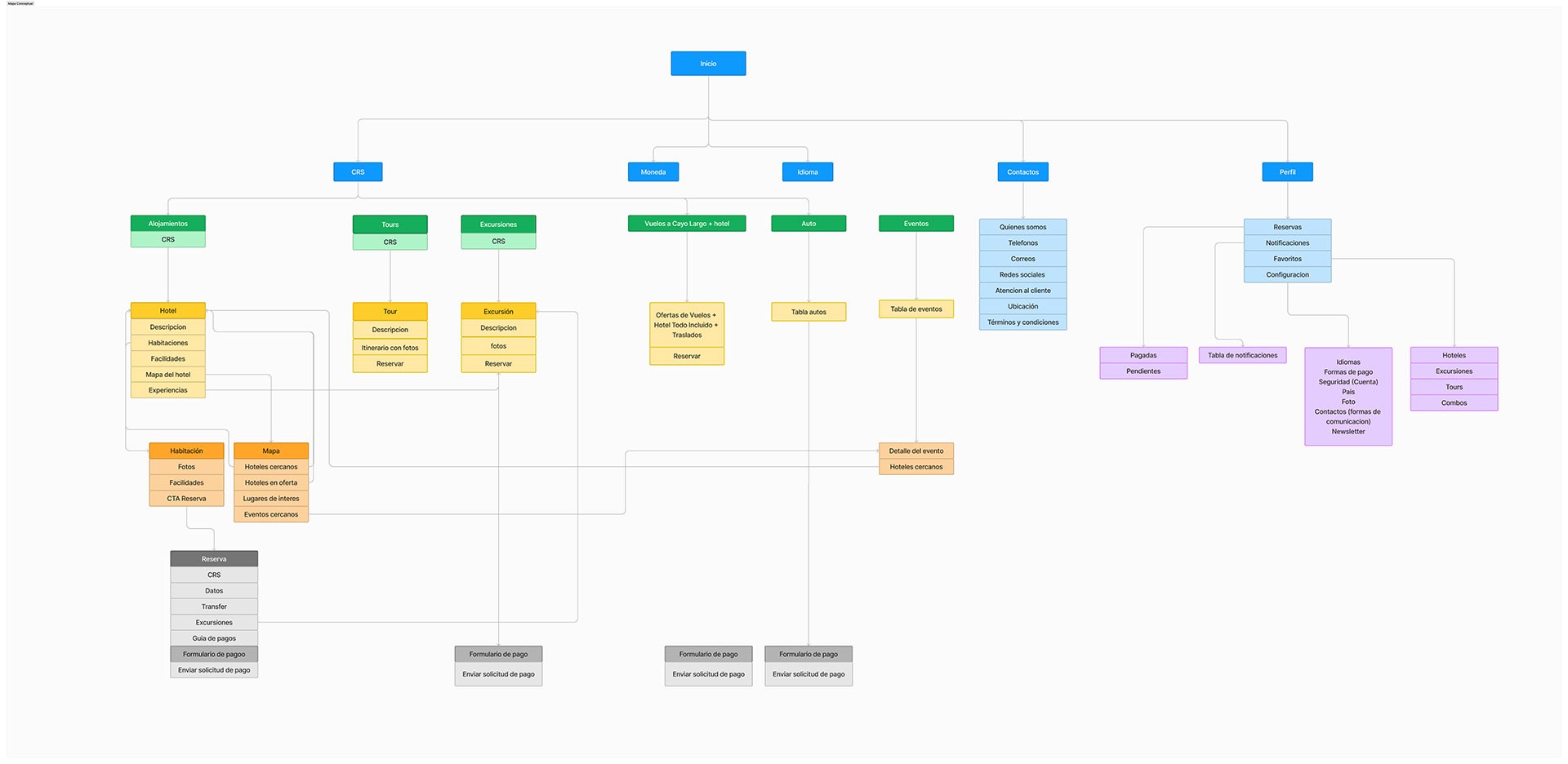
Information Architecture: Structure Before Aesthetics

Through the IA phase, I defined the content hierarchy, primary navigation, and the logical structure of each site section. This was the foundational deliverable of the entire project — every subsequent UI decision grew from this structure. Without solid IA, a tourism booking platform with multiple product types (accommodations, tours, excursions) becomes a maze.

03.

Information Architecture: Structure Before Aesthetics

Through the IA phase, I defined the content hierarchy, primary navigation, and the logical structure of each site section. This was the foundational deliverable of the entire project — every subsequent UI decision grew from this structure. Without solid IA, a tourism booking platform with multiple product types (accommodations, tours, excursions) becomes a maze.

Information architecture
Content hierarchy
Navigation by sections

04.

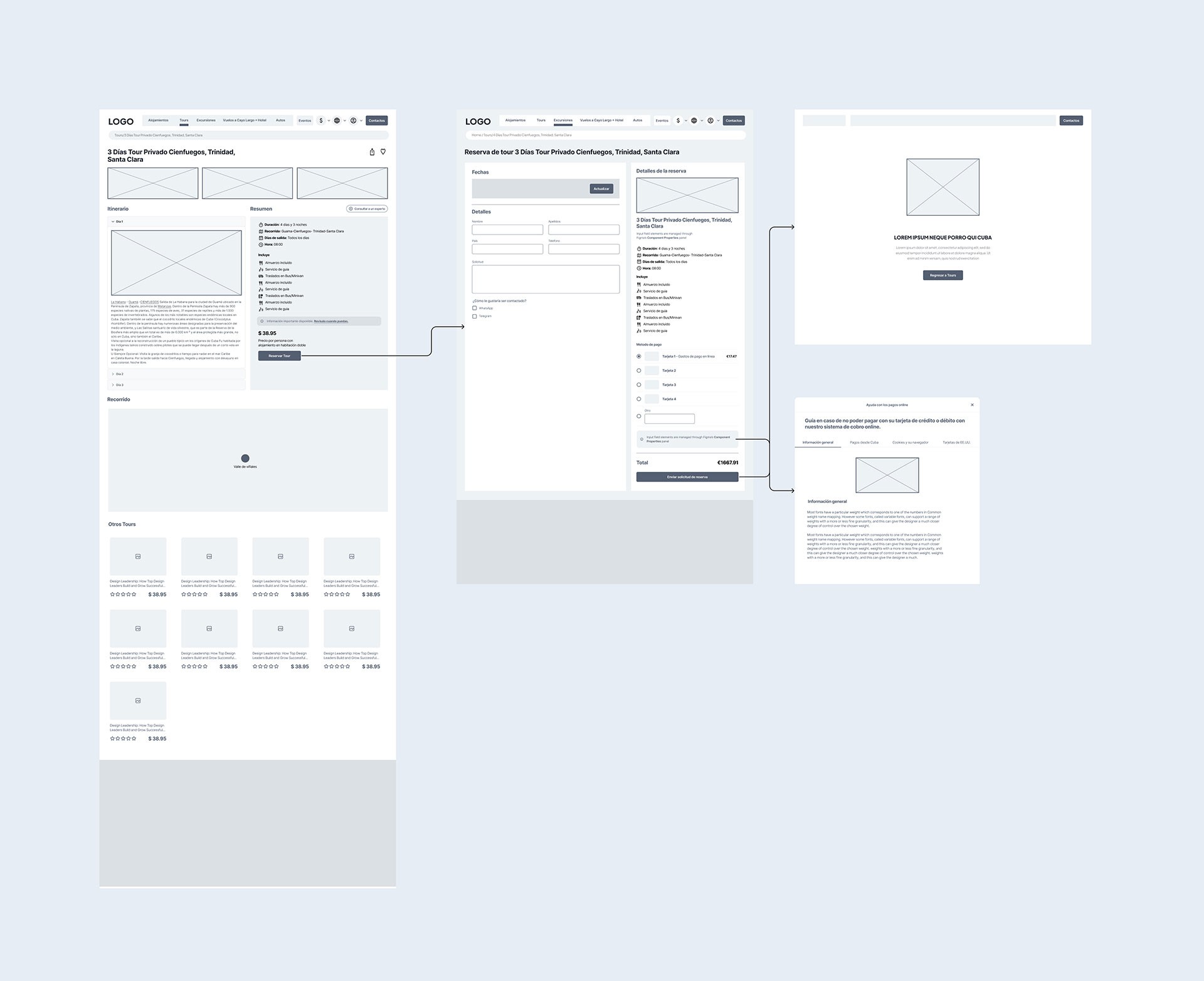
Low-Fidelity Wireframes: Validating Structure Before Investing in UI

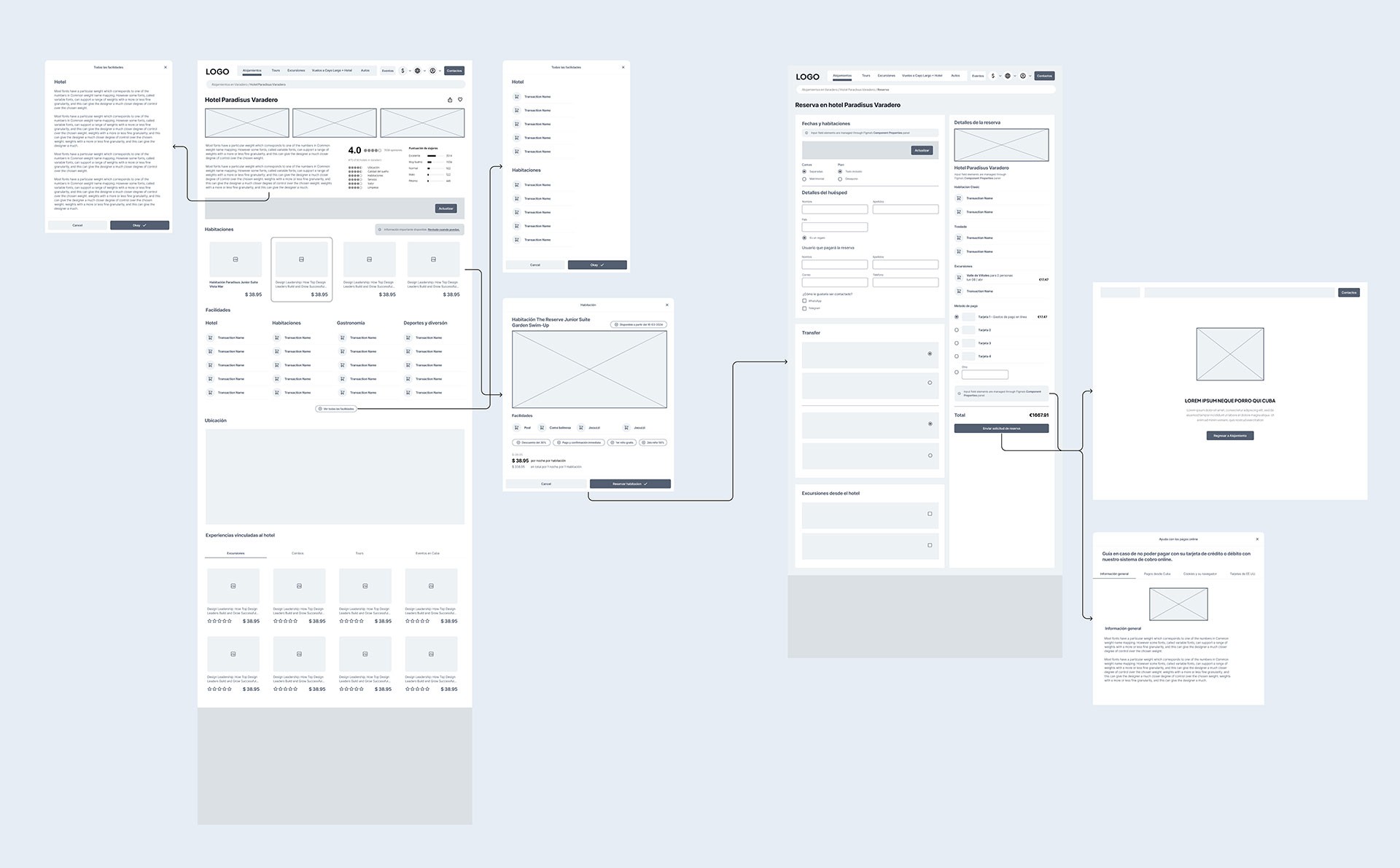
I designed lo-fi wireframes for the critical sections before moving to high fidelity. The goal was to validate the information architecture with the team and stakeholder without the visual noise of color and typography. The accommodation and tour wireframes went through the most iterations — these are the flows with the highest direct impact on conversion rate.

04.

Low-Fidelity Wireframes: Validating Structure Before Investing in UI

I designed lo-fi wireframes for the critical sections before moving to high fidelity. The goal was to validate the information architecture with the team and stakeholder without the visual noise of color and typography. The accommodation and tour wireframes went through the most iterations — these are the flows with the highest direct impact on conversion rate.

Lo-fi wireframes
Validation with stakeholders
Structure iteration
Interface Design — Decisions Built for Conversion

05.

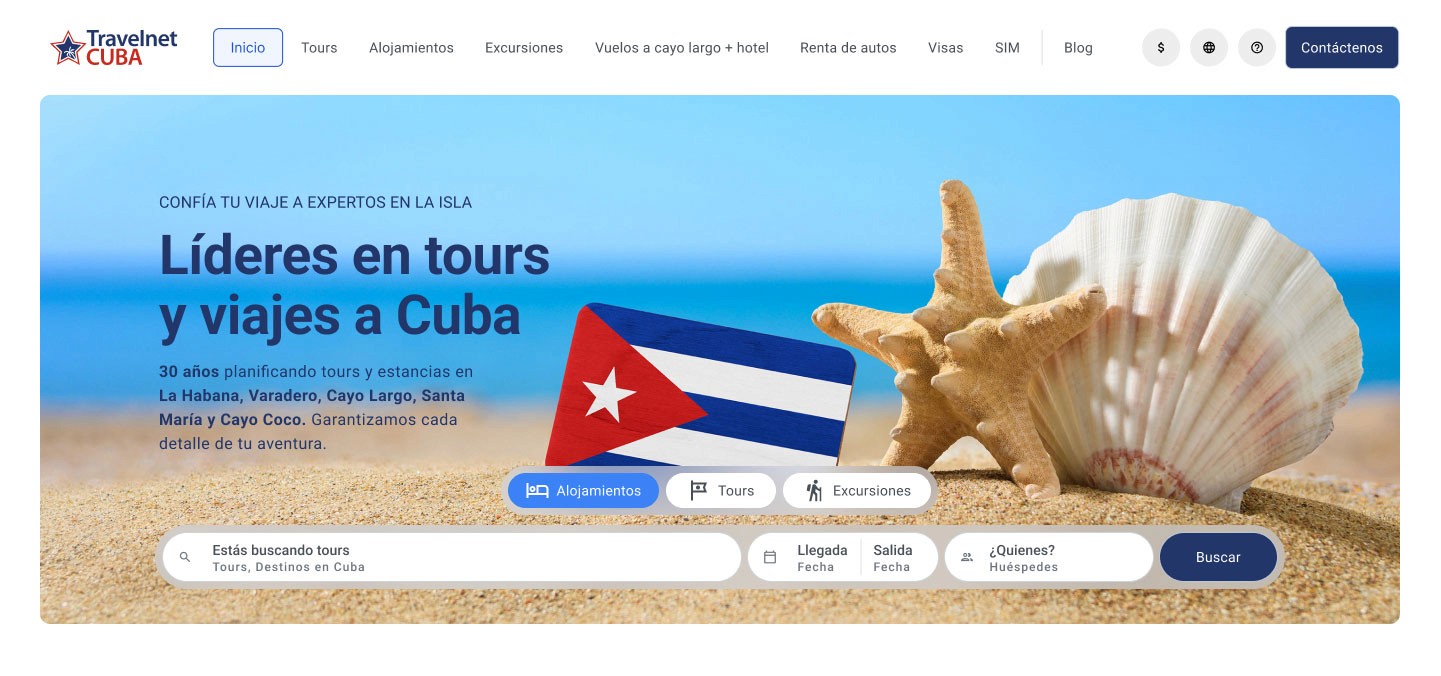
Homepage: Booking Hub With a Clear Value Proposition

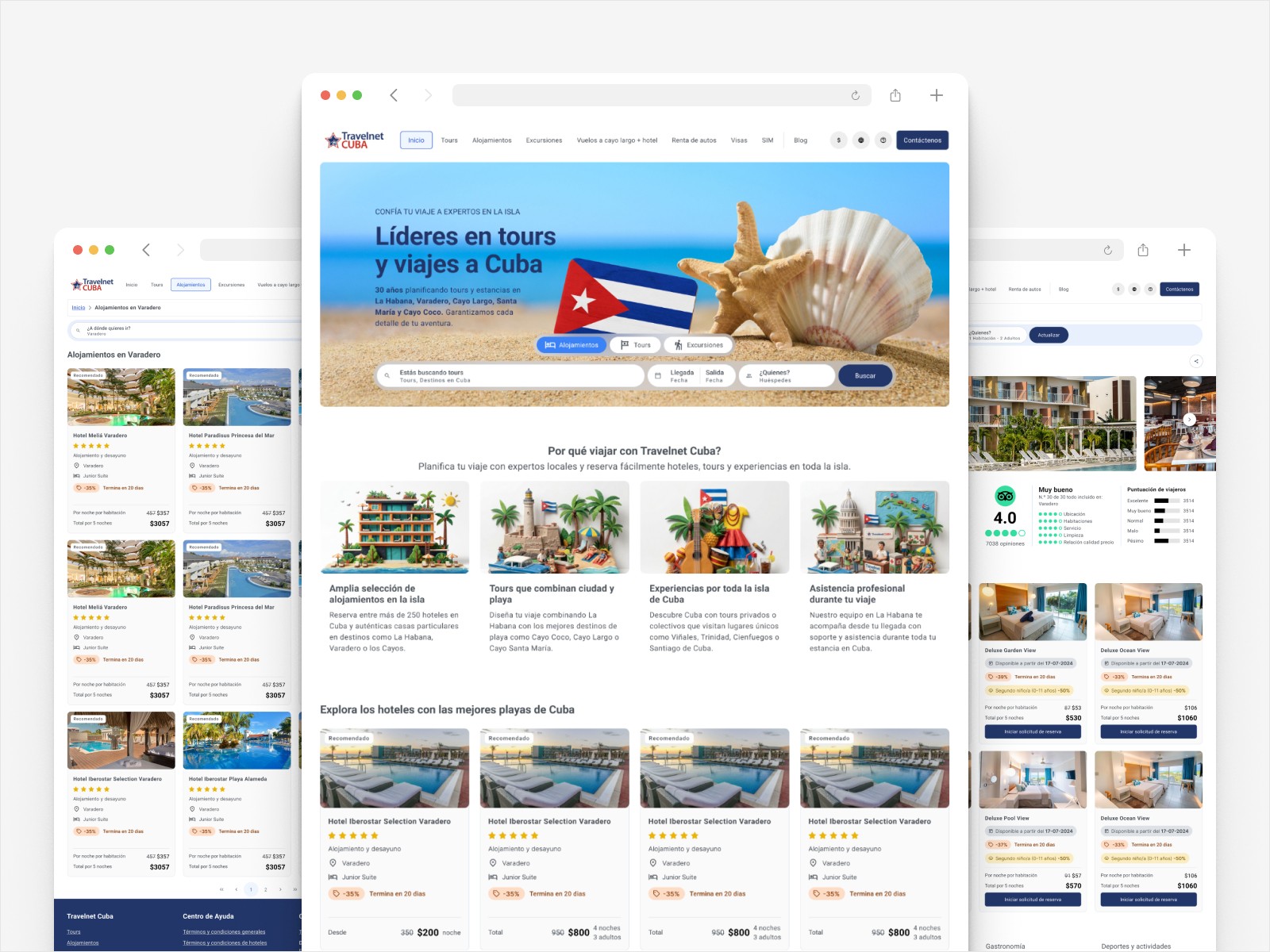
I designed the homepage around a hero section with a visible value proposition and a central booking hub with tabs differentiated by product type: tours, accommodations, and excursions. Each tab enables quick searches without leaving the main page. I completed the homepage with recommended tours, popular destinations, special offers, and testimonials — a conversion architecture designed to minimize the time between arrival and booking intent.

05.

Homepage: Booking Hub With a Clear Value Proposition

I designed the homepage around a hero section with a visible value proposition and a central booking hub with tabs differentiated by product type: tours, accommodations, and excursions. Each tab enables quick searches without leaving the main page. I completed the homepage with recommended tours, popular destinations, special offers, and testimonials — a conversion architecture designed to minimize the time between arrival and booking intent.

Mental map
Team lineup
Scope definition
06.

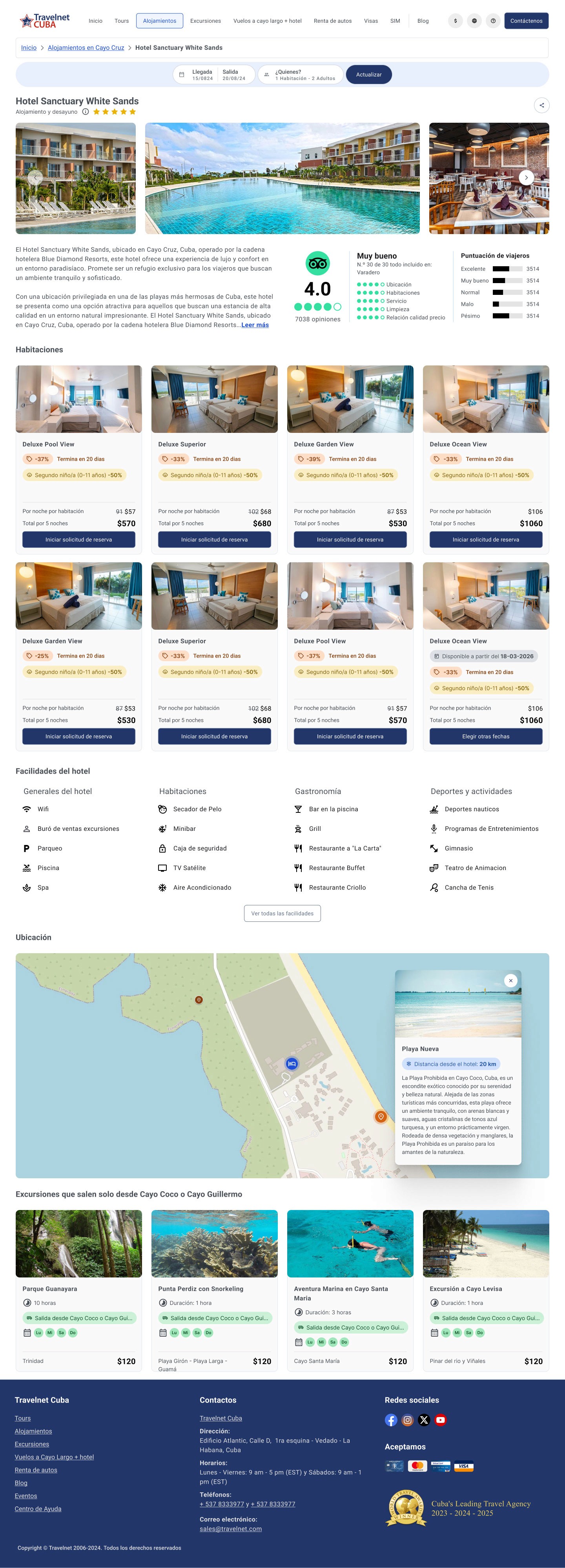
Search Results and Hotel Detail: Advanced Filters and Interactive Map

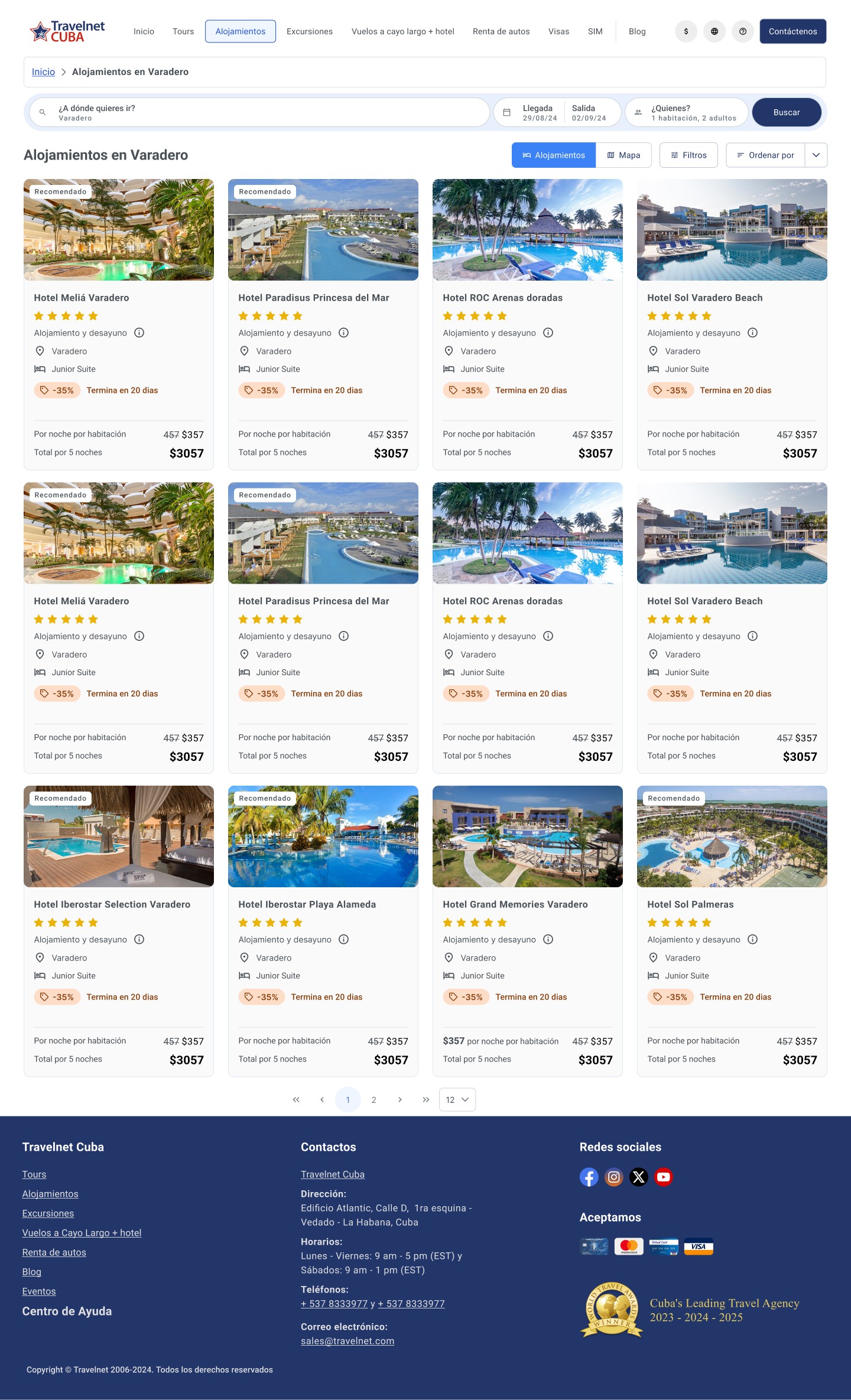
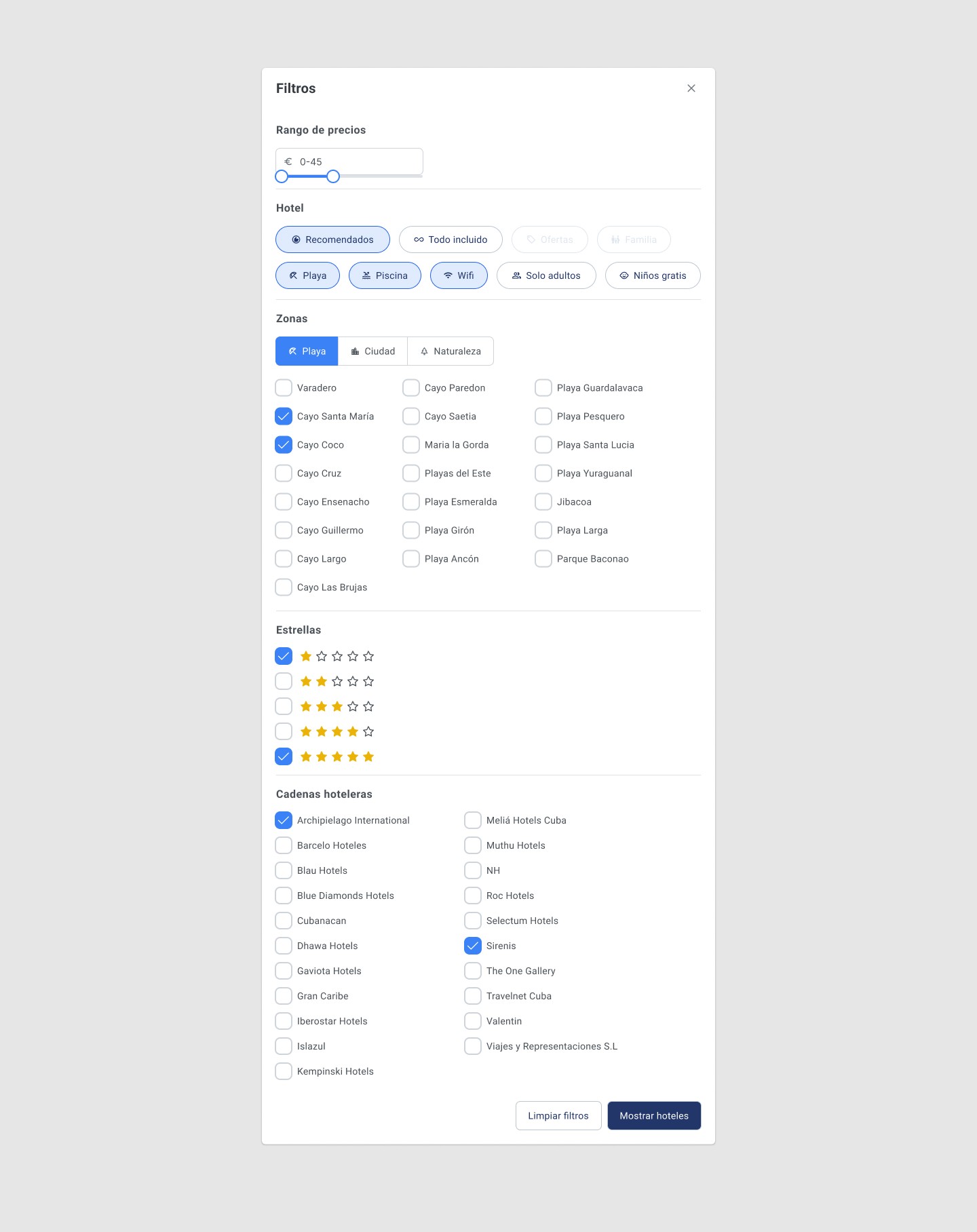
The results page includes advanced filters by price, star rating, amenities, and location. The hotel detail page integrates an image gallery, description, services, and an interactive map with nearby points of interest — a standard on global booking platforms like Booking.com, implemented here for the first time on this platform.

06.

Search Results and Hotel Detail: Advanced Filters and Interactive Map

The results page includes advanced filters by price, star rating, amenities, and location. The hotel detail page integrates an image gallery, description, services, and an interactive map with nearby points of interest — a standard on global booking platforms like Booking.com, implemented here for the first time on this platform.

07.

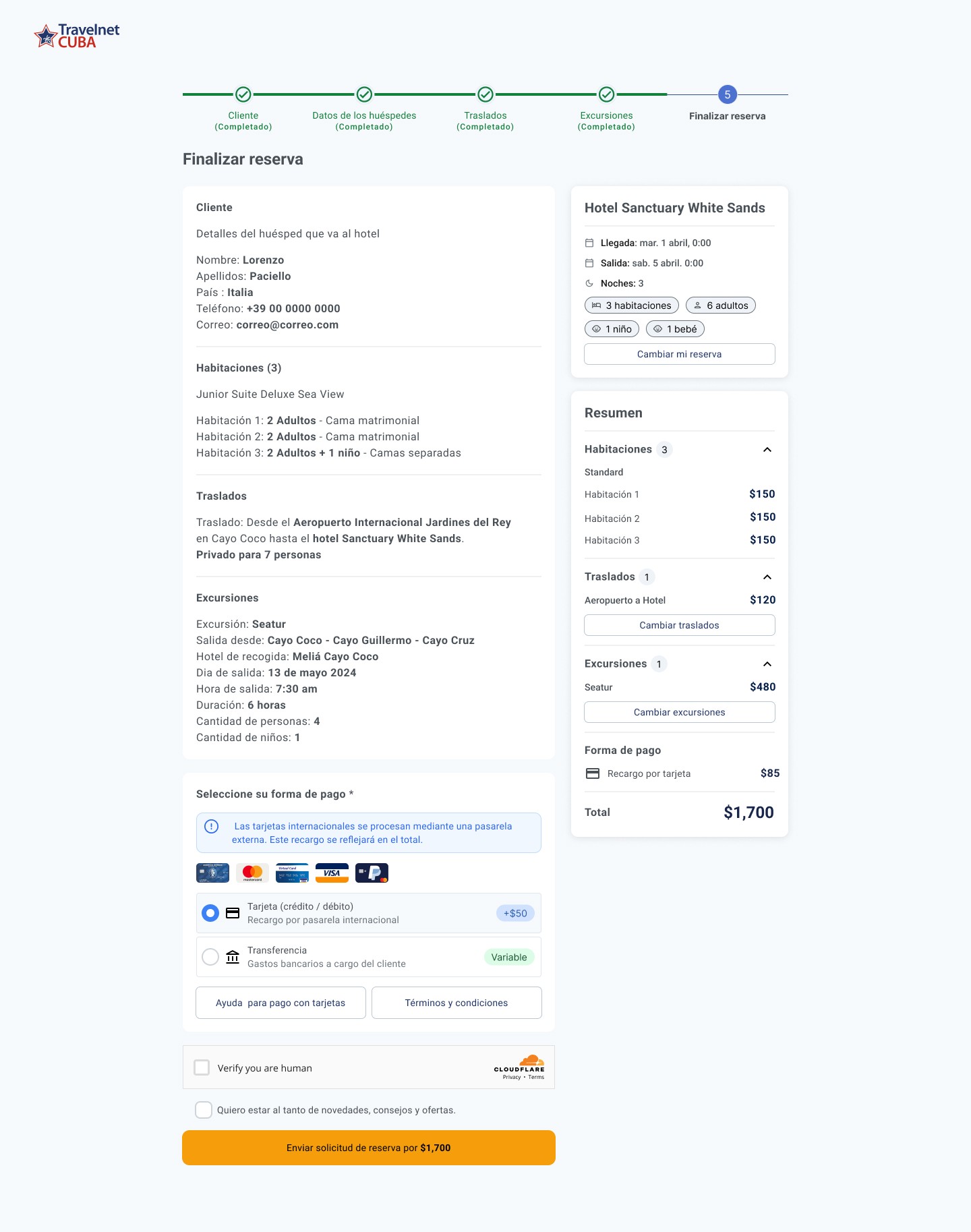
Step-by-Step Booking Flow: Designed to Maximize Conversion

I designed the complete booking flow: room selection → personal details → payment options → confirmation. Each step includes a clear progress indicator and real-time validation. The objective was to reduce friction to a minimum at the moment of highest purchase intent.

07.

Step-by-Step Booking Flow: Designed to Maximize Conversion

I designed the complete booking flow: room selection → personal details → payment options → confirmation. Each step includes a clear progress indicator and real-time validation. The objective was to reduce friction to a minimum at the moment of highest purchase intent.

08.

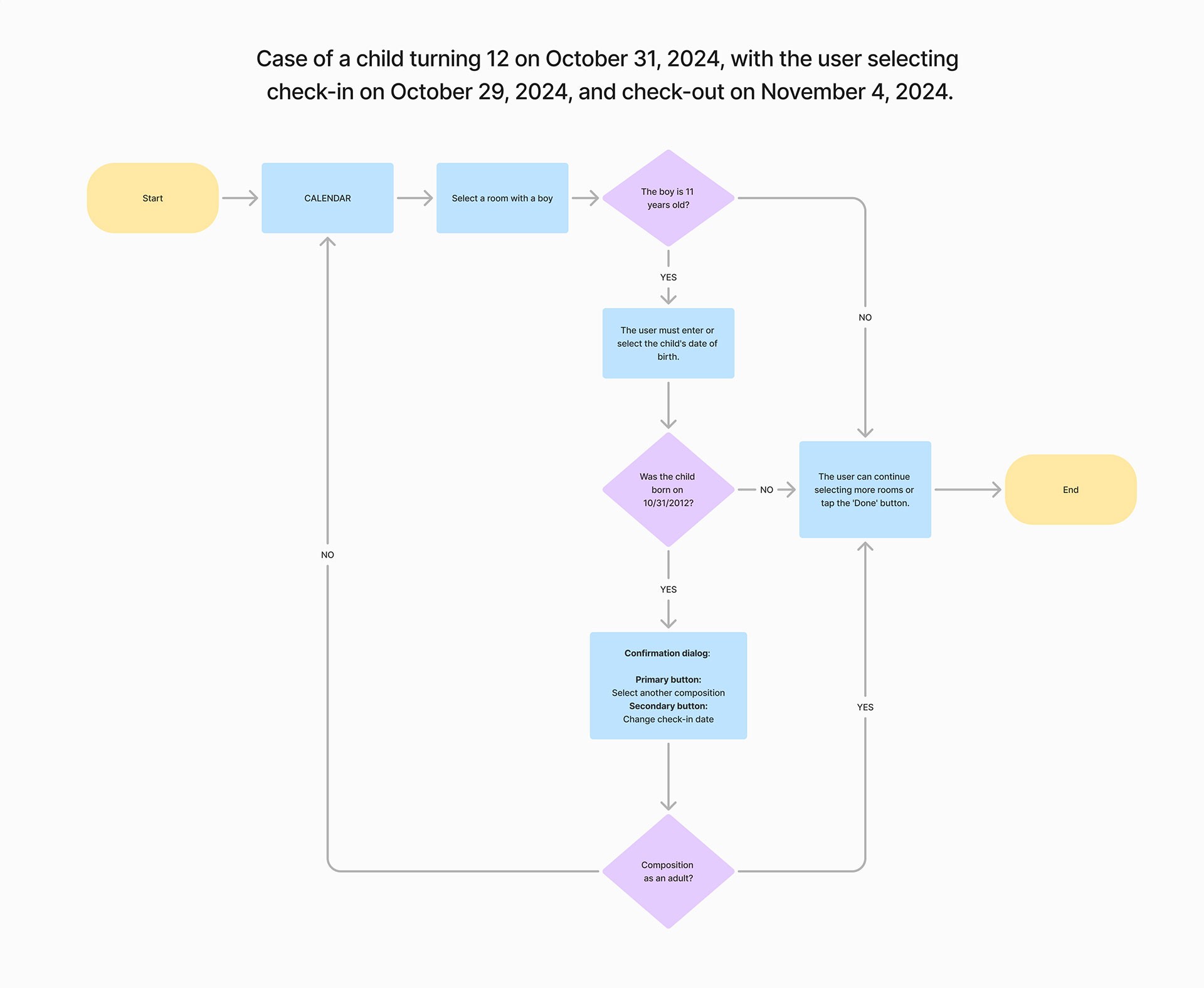
CRS Flow Diagram: Central Reservation System

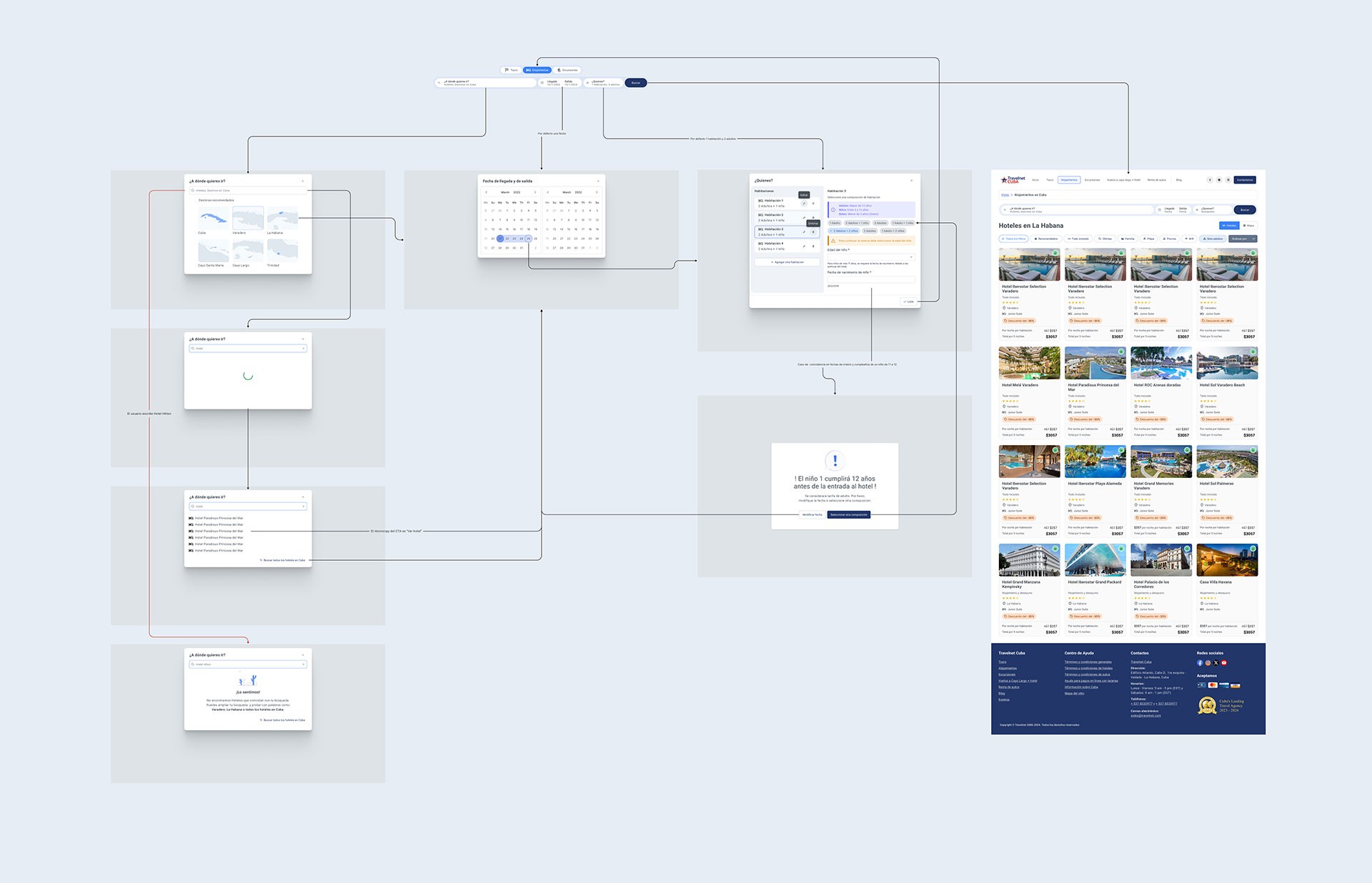
I designed the complete user flow for the Central Reservation System (CRS) for accommodations, including the edge case of bookings involving minors and age limit rules. This deliverable functioned as a visual contract between design and development: any deviation during implementation was immediately detectable against the original diagram.

08.

CRS Flow Diagram: Central Reservation System

I designed the complete user flow for the Central Reservation System (CRS) for accommodations, including the edge case of bookings involving minors and age limit rules. This deliverable functioned as a visual contract between design and development: any deviation during implementation was immediately detectable against the original diagram.

09.

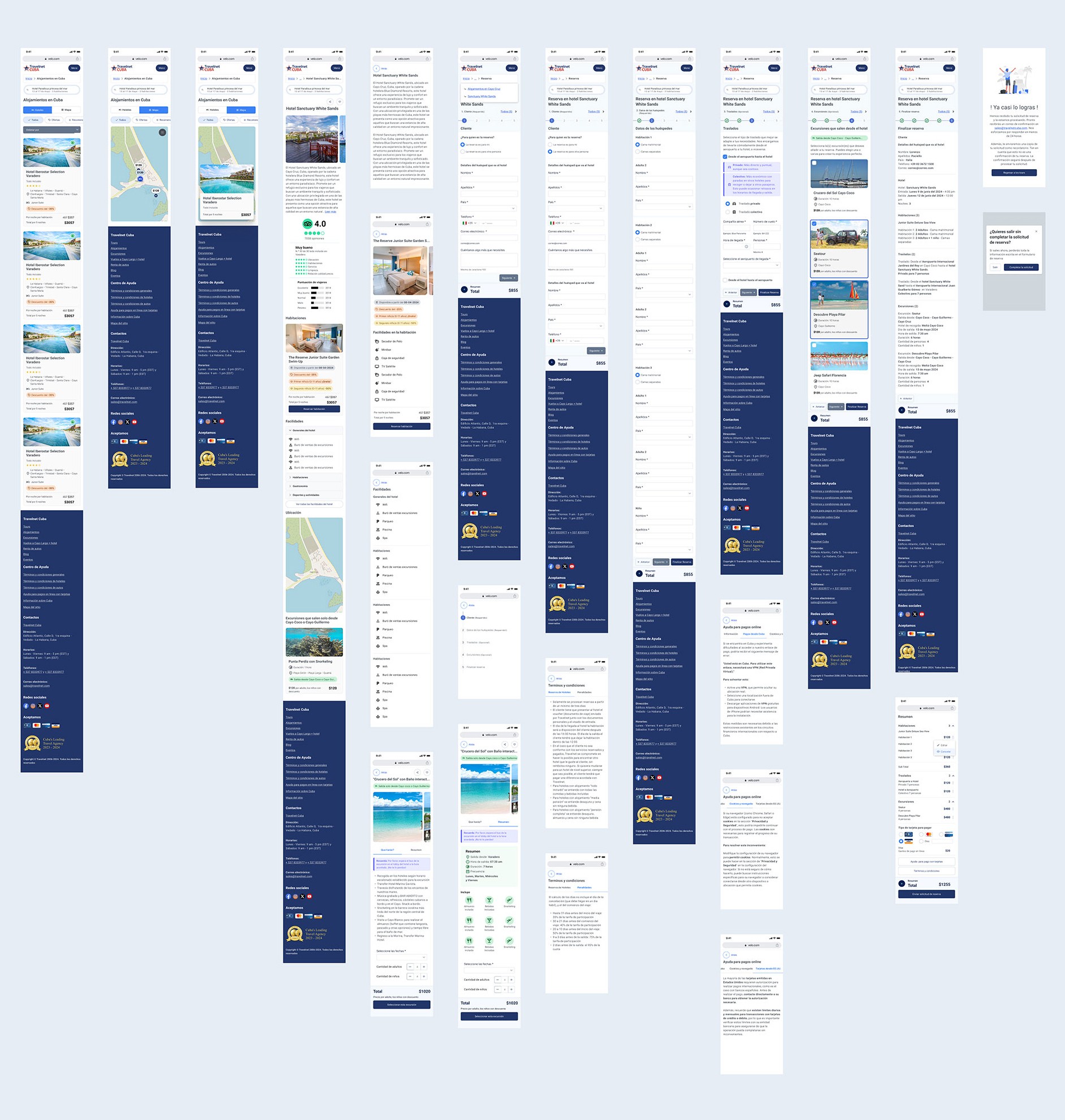
Responsive Design: Optimized for Mobile

I adapted all critical components for small screens: calendars, search filters, cards, and forms. Tourism is one of the highest mobile-traffic sectors — a booking flow that doesn't work on a smartphone loses conversions directly.

09.

Responsive Design: Optimized for Mobile

I adapted all critical components for small screens: calendars, search filters, cards, and forms. Tourism is one of the highest mobile-traffic sectors — a booking flow that doesn't work on a smartphone loses conversions directly.

Design System — From UIKit to a Proprietary System

From PrimeVue to a Complete Design System

I started from PrimeVue's UIKit and extended it into a proprietary design system with documented design patterns, enriched components, and defined interaction behaviors. This system gave the development team the foundation to implement with consistency, and gave the design side the ability to scale without accumulating visual debt.

I defined five critical design patterns that no digital booking product can afford to ignore. Each was documented with variants, states, and implementation guidelines for development:

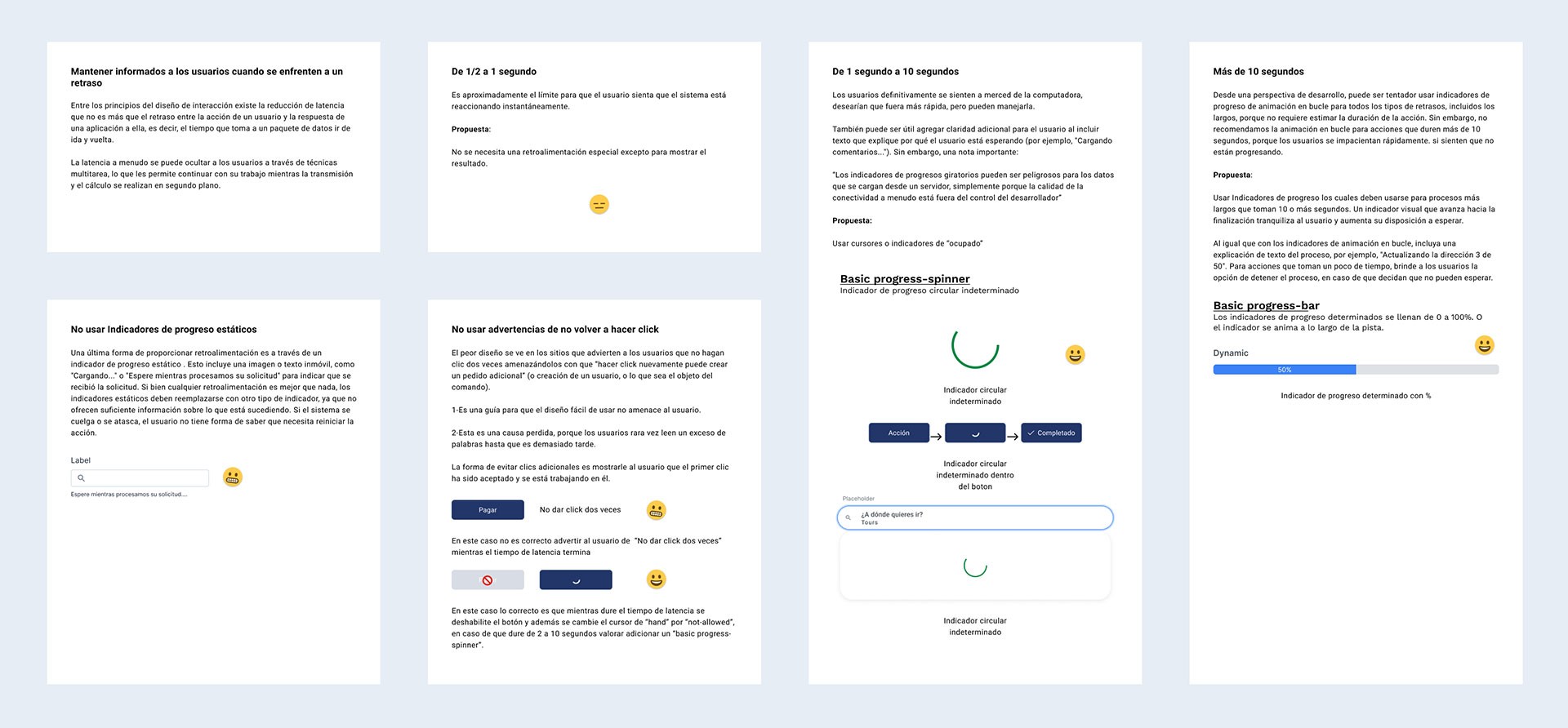
Pattern 01

Latency Reduction

Differentiated loading states based on wait type: skeleton screens for content, spinners for discrete actions. Critical on a booking platform making external system queries.
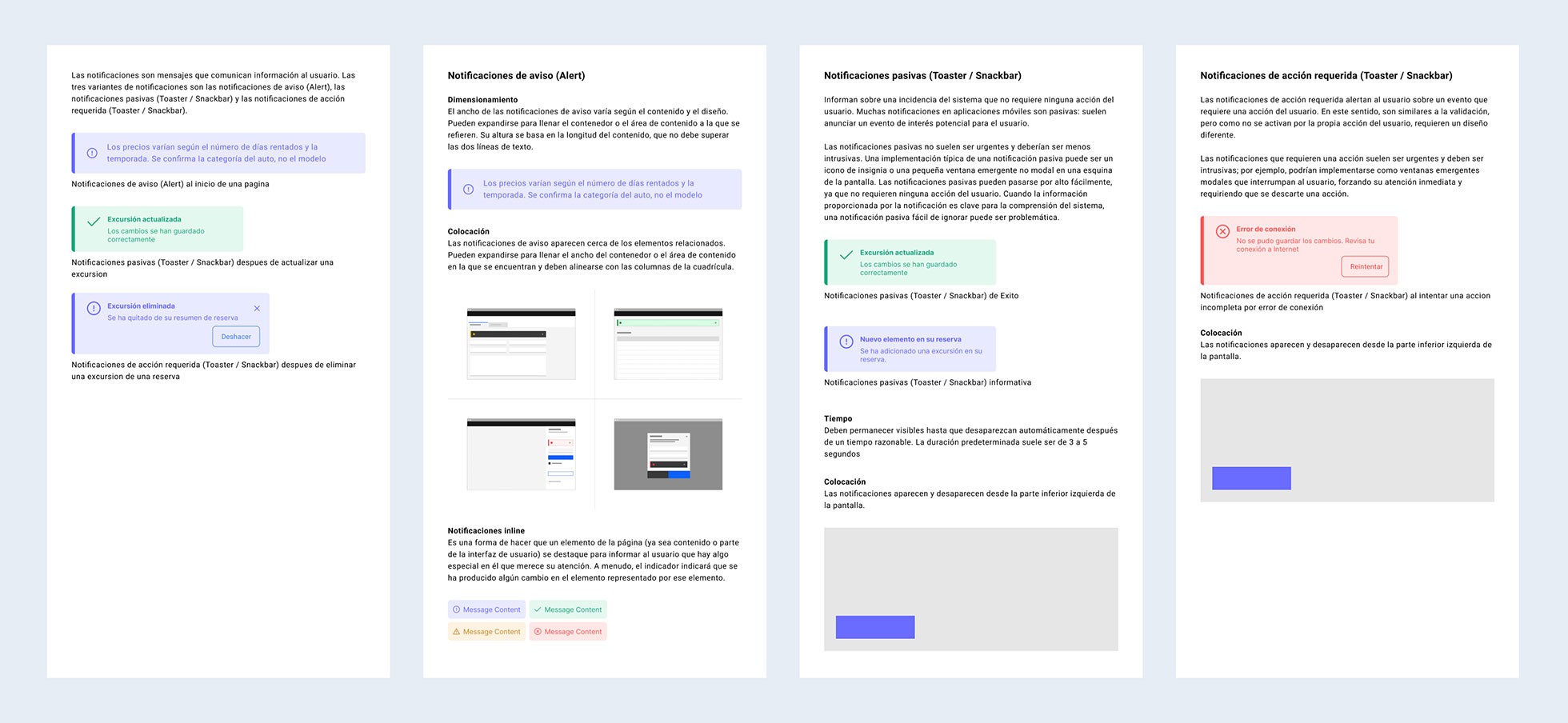
Pattern 02

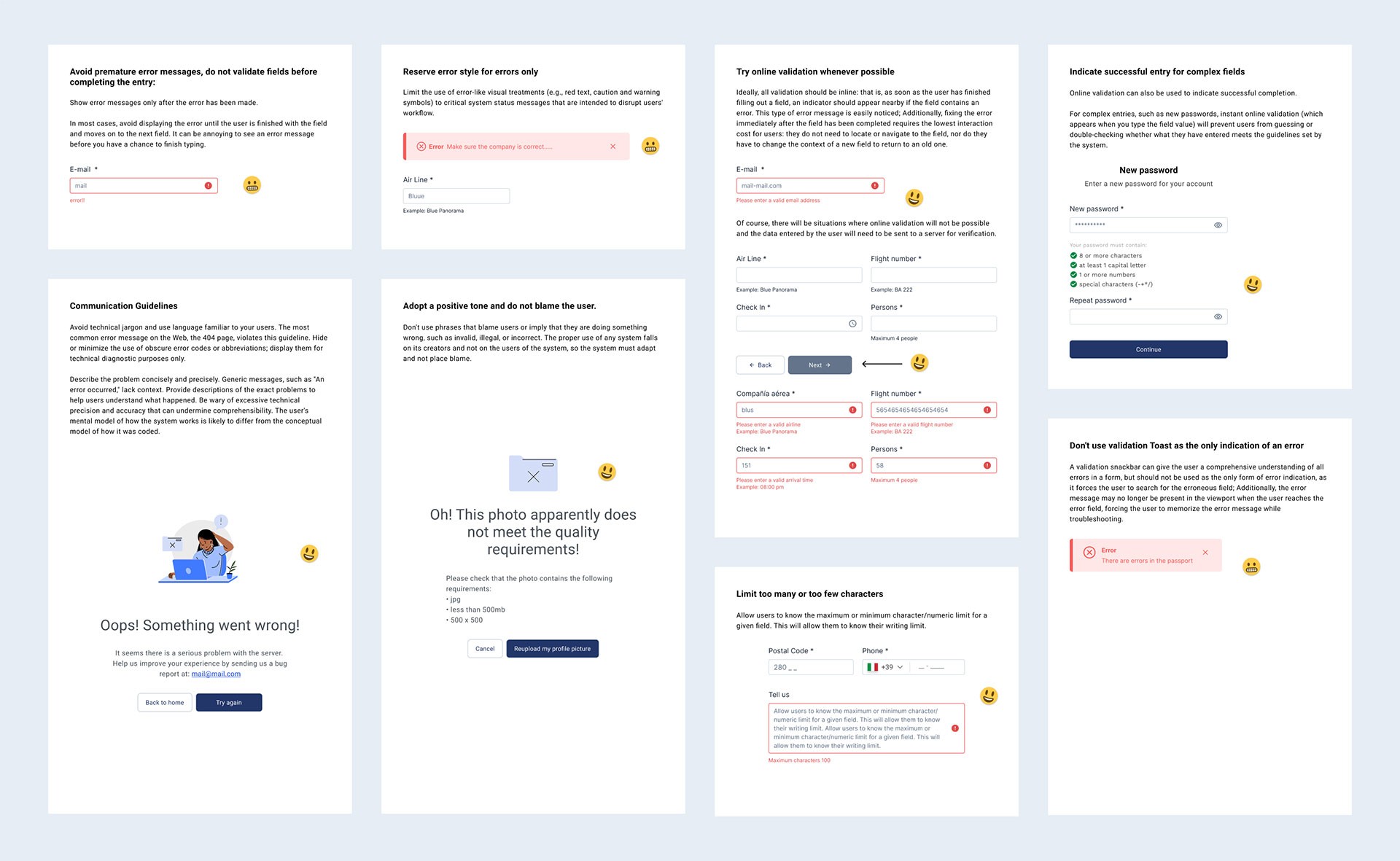
Notifications

A notification system with informational, success, warning, and error variants. Positioning, duration, and dismiss behavior standardized across the entire
Pattern 03

Error Handling

Validation errors, system errors, and connection errors — each with contextual messaging and clear recovery actions. No error state leaves the user without a path forward.
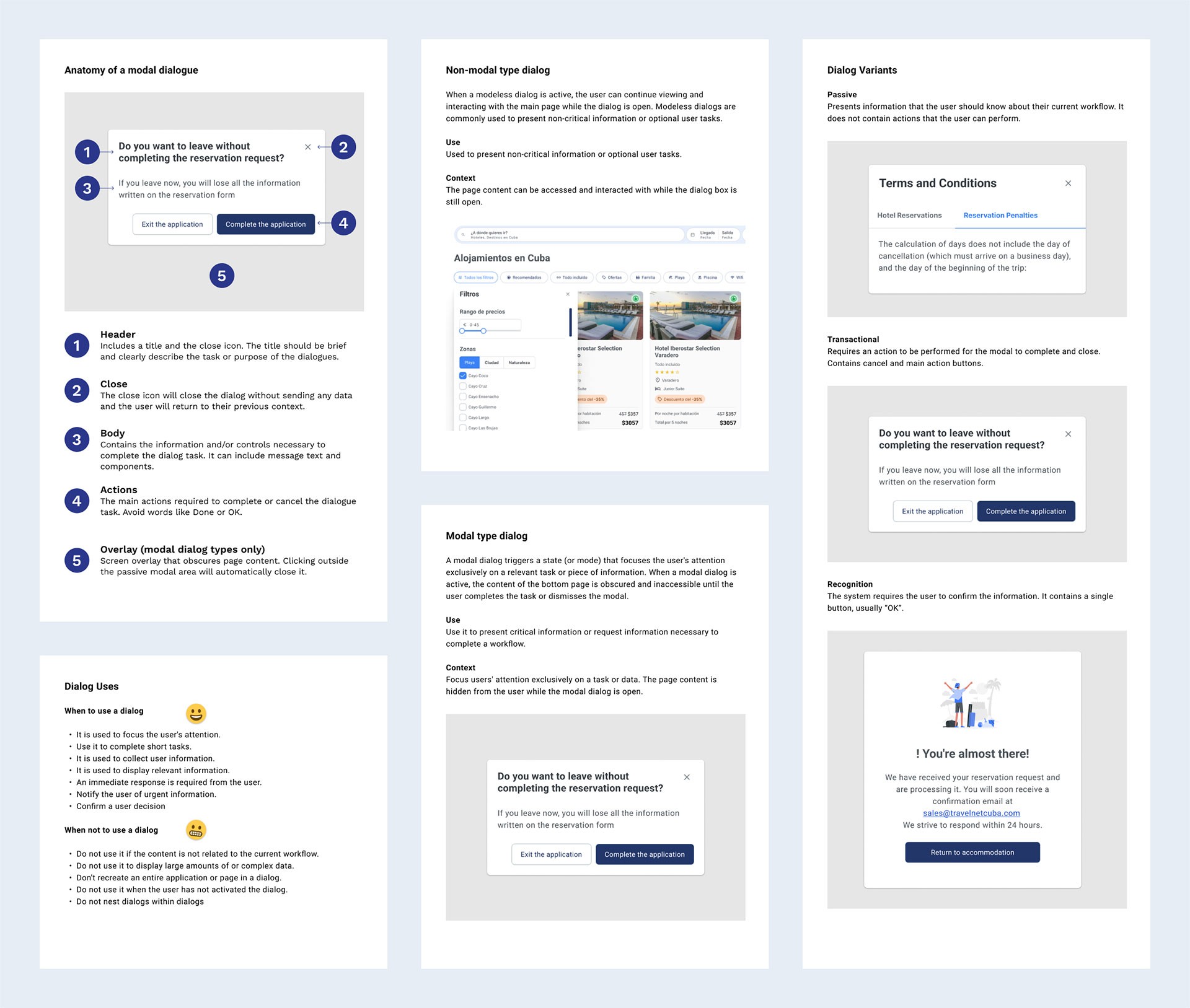
Pattern 04

Dialogs

Modal dialog variants for confirmations, alerts, overlay forms, and critical messages. Each variant has documented dismiss behavior and primary/secondary action definitions.
Why These Patterns Matter Beyond Design

These four patterns didn't just improve the user experience — they became the communication layer between design, development, PO, and SM. By standardizing how critical system states look and behave, we reduced development time, eliminated ambiguity in sprints, and gave the team a shared language for discussing the product.

UX-QA: Supervising Implementation

Beyond design, I took on the UX-QA role throughout implementation. I reviewed developed components against documented patterns, verified that interaction flows matched approved designs, and confirmed that the final in-browser experience was consistent with design intent. This role is uncommon in low-UX-maturity teams — and it was what ensured the design work wasn't lost in the handoff.

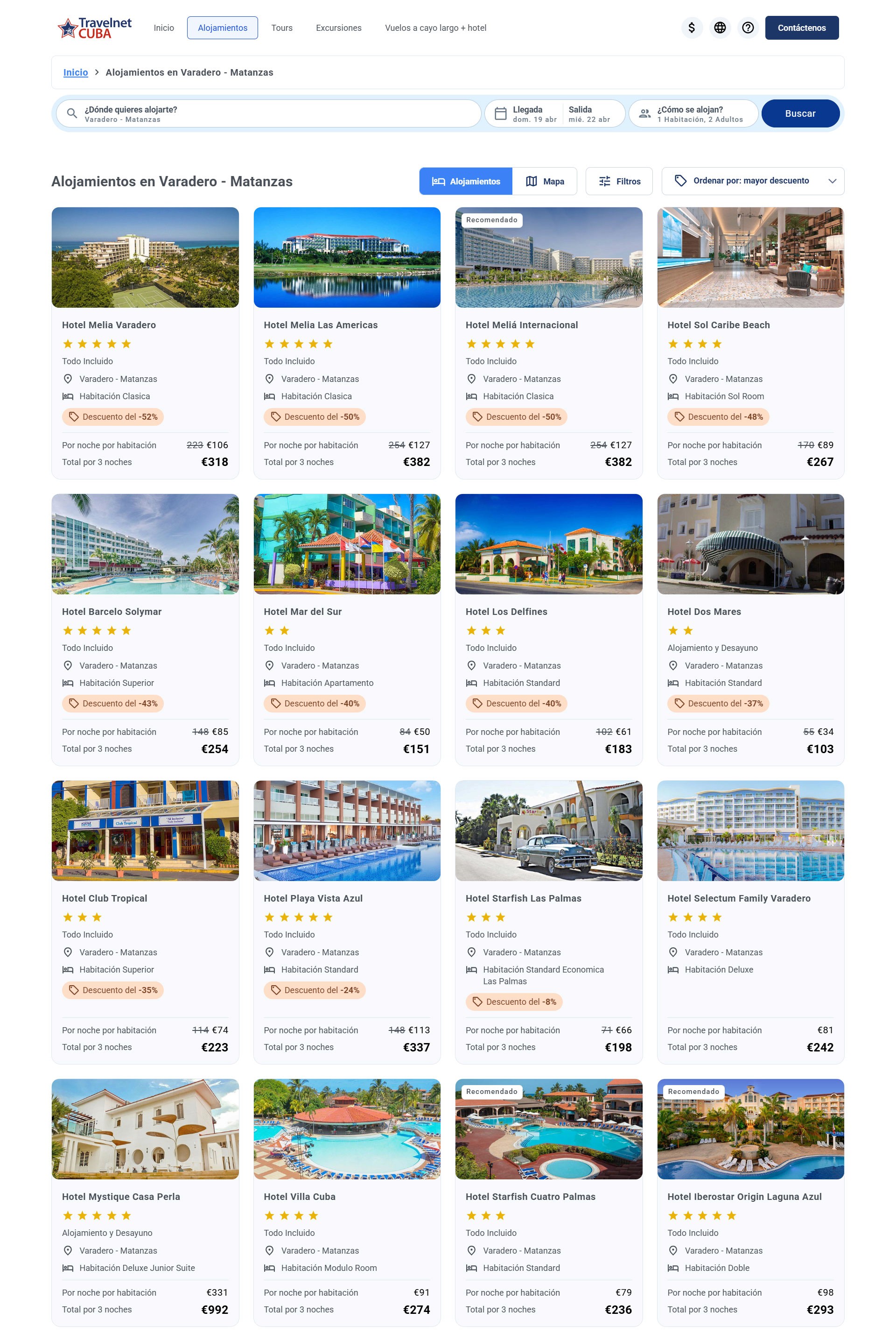
Before vs. After

This before/after isn't just aesthetic — it's the result of a business transformation. The previous platform couldn't sell. The new one was designed from the first mind map to convert visits into bookings.

Travelnet Cuba · Before

  • Outdated, overloaded design

  • Confusing navigation with no hierarchy

  • No structured booking flow

  • Informational product — not a sales tool

  • No design system or patterns

Travelnet Cuba · After

  • Modern interface built for conversion

  • Clear information architecture

  • Optimized step-by-step booking flow

  • Booking hub integrating 3 product types

  • Design system with 4 documented patterns
Current Status and Expected Results

Project in progress · launching soon

The project began in February 2024 and is approaching launch. Business outcomes — conversion, bookings, retention — will be measurable post-launch. What has been delivered: information architecture, complete design system, documented interaction patterns, validated booking flows, and completed implementation supervision.

Feb 2024

Inicio del proyecto · en curso hacia lanzamiento.

4 roles

UX · UI · IxD supervisor · QA-UX

Prime Vue → DS

UIKit extendido hasta Design System propio

Libertad total

Decisiones de diseño y producto 100% propias

I treat every project I take on as if it were my own. This means tough decisions, rigorous design criteria, and improvements you'll see in your product, your conversions, and your team's workflow. If this sounds like what you're looking for, let's talk.

© All rights reserved 2026 – Erick Rodriguez

I treat every project I take on as if it were my own. This means tough decisions, rigorous design criteria, and improvements you'll see in your product, your conversions, and your team's workflow. If this sounds like what you're looking for, let's talk.

© All rights reserved 2026 – Erick Rodriguez

I treat every project I take on as if it were my own. This means tough decisions, rigorous design criteria, and improvements you'll see in your product, your conversions, and your team's workflow. If this sounds like what you're looking for, let's talk.

© All rights reserved 2026 – Erick Rodriguez